Designing a Dealership Inventory Catalog for the Reality of the Showroom
A dealership inventory catalog is not just a database view. For a sales agent, it is part of the customer conversation. It is the tool they use when someone asks, “Do you have this in black?”, “Is there another Bentley in this price range?”, or “Can I see something similar with lower mileage?”
Questions happen on the showroom floor, beside a vehicle, in a delivery bay, and while in mid conversation talking with a interested customer.
That changed how we thought about performance. This was not just about shaving milliseconds off a page load or optimizing a frontend benchmark. In this environment, performance is sales continuity. Every spinner interrupts the conversation. Every delay makes a sales agent loose confidence breaking the sales conversation flow.
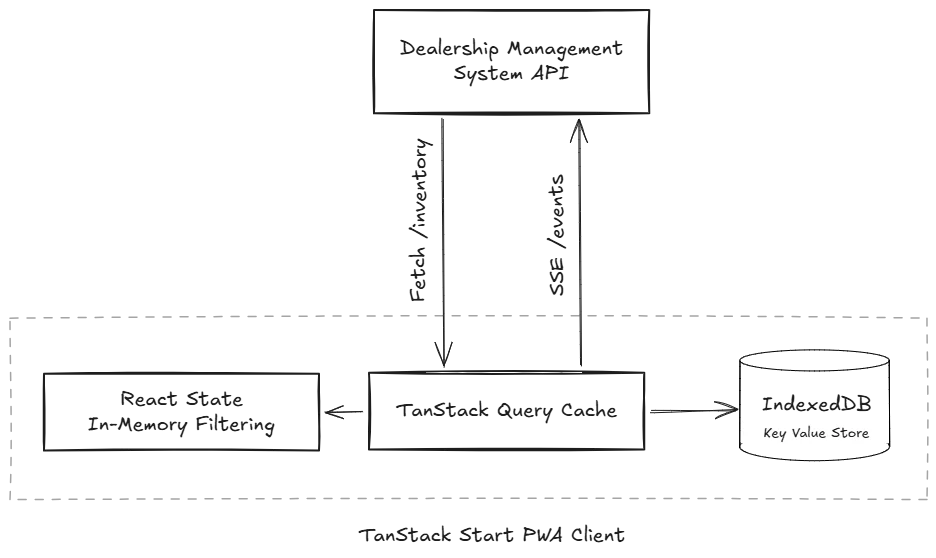
So we designed the catalog around a simple architectural:
Load the inventory once, keep it close to the user, filter it locally, and ask the server only when something has changed.
Performance as sales infrastructure
Traditional inventory websites often assume the network sits in the middle of every interaction. The user selects a filter, the client sends a request, the server applies the filter, and the UI updates when the response comes back.
That model is reasonable for many public websites. It is less reasonable for a sales tool used throughout the day on shared showroom iPads.
A sales agent does not experience filtering as a backend query. They experience it as part of a conversation. If the customer asks to see available Bentleys under a certain price range, the agent needs to answer immediately. If the customer changes their mind and asks for Rolls Royce instead, the catalog should respond at the pace of speech, not the pace of Wi-Fi.
Instead of treating the device as a thin client, we let it hold the inventory and do most of the interactive work itself.
Thinking Local First
The most important decision was also the simplest, fetch the full inventory in one request.
const { data: vehicles = [] } = useQuery({
  queryKey: ["inventory"],
  queryFn: () => getInventory(),
});
Once the data is on the device, the user no longer waits on the server to explore brands, availability, status, make, model, year, body style, exterior color, price range, search, and sort.
Changing from Bentley to Lamborghini, filtering by availability, narrowing by price, or sorting by newest arrivals becomes an in memory operation.
Loading the full inventory upfront creates a larger initial payload. But the catalog is not a casual one-off page. It is PWA that runs on the Agents iPad, in an environment where interaction speed matters more than minimizing the first response at all costs.
The payoff is that every filter interaction feels instant. The network is removed from the critical path of the sales conversation.
Making repeat visits immediate
The obvious risk of loading the full inventory is startup time.
A large payload might be acceptable once, but it cannot become a tax every time an agent opens the catalog. A showroom tablet should not feel like it is starting from zero every session.
To avoid that, the catalog persists the TanStack Query cache to IndexedDB. On startup, the app restores the previous inventory from the device before starting a network fetch.
The storage layer is intentionally small:
export const persister = localStore({
  storage: {
    getItem: (key) => get(key),
    setItem: (key, value) => set(key, value),
    removeItem: (key) => del(key),
  },
});
The app waits for IndexedDB rehydration before allowing the network request to run. That means a returning agent can see inventory from local storage almost immediately, while the app refreshes in the background when needed.
This is what makes the upfront payload practical. The catalog pays the cost once, keeps the data on the device, and avoids turning every app launch into a network dependency.
IndexedDB is important here because the inventory is too large and too valuable for localStorage. Vehicle records include metadata, pricing, categorization, image URLs, status fields, and other catalog data. IndexedDB gives the app larger asynchronous storage without blocking the main thread.
Streaming realtime inventory updates
Local first browsing creates a freshness problem. If inventory is cached for performance, what happens when a vehicle sells, changes status, or becomes unavailable? A fast catalog is not useful if it confidently shows stale information.
The naive answer was polling, ask the server every few seconds or minutes whether anything changed. But we saw that this would create unnecessary network hops and burn our Server Less Cloud budget.
Instead, the catalog uses a lightweight Server Sent Events channel.
const es = new EventSource(`${API_BASE}/v1/vehicles/events`);

es.onmessage = (event) => {
  const { updates } = JSON.parse(event.data);

  if (updates.length()) {
    queryClient.invalidateQueries({ queryKey: ["inventory"] });
  }
};
The client keeps track of the last hash it saw for each feed. If a new event contains the same hash, nothing happens. If a hash changes, the client invalidates the inventory query and lets TanStack Query handle the refetch.
TanStack Query handles fetching, caching, deduping, updating the UI, and reconciling the new inventory.
With this architecture the catalog can be aggressive about local performance without becoming careless about accuracy.
What changed
The takeaway is that architecture should always thrive to match the environment where the product is used.
That is why the catalog is built around a local first browsing experience. Load the inventory once. Keep it on the device. Filter it locally. Cache as much as possible. Use a server signal to refresh when something changes.
- For the agent, the catalog opens quickly, responds immediately, and keeps up with the speed of the conversation.
- For the business, that means fewer interruptions, more confident sales agents.